Starlink Mini vs Standard (V4): router, Wi-Fi range, power draw and which to choose
Compare Starlink Mini (V5 + Router Mini) and Standard (V4 + Router 3): built-in vs external router, Wi-Fi coverage, power draw, US/UK order kits and referral credit.
Editorial transparencyWritten by Bruno Luiz using Starlink's public specs, help center and order pages. We take part in the referral program and may earn a reward via the link.Read more
Written by Bruno Luiz using Starlink's public specs, help center and order pages. We take part in the referral program and may earn a reward via the link.
Starlink
Applied automatically through Cecília's link.
Quick answer
Starlink Mini is the better pick for simple setup, low backup power draw on a UPS or battery, and portable mounting. Standard (V4 + Router 3) wins on indoor Wi-Fi 6 coverage and dual Ethernet ports. Both kits qualify for the official referral bill credit when ordered on starlink.com; see which hardware each plan ships below.
Where each kit shows up on US and UK order pages
On current residential checkouts in the United States and United Kingdom, the hardware kit is tied directly to the speed tier you select rather than picked separately.
In Nevada (US), all three residential plans ship as a $0 upfront and $0/month rental ($20 plus taxes shipping today; you must return the rental hardware if you cancel, with no fixed term). Residential 100 Mbps ($38.50/mo, regular $55, optional $99 installation) includes a Starlink V5 with a Router Mini. Residential 200 Mbps ($59.50/mo, regular $85, free installation) switches to a Starlink V4 with Router 4, and Max ($91/mo, regular $130, free installation) comes with Standard 4 X plus an extra Router Mini.
In London (UK), the order page shows "No contracts" with £0 hardware rental (£19 shipping today; return the kit if you cancel): 100 Mbps (£40/mo, optional £74 installation) bundles a Mini Rental with a Router Mini, while 200 Mbps (£60/mo, optional £74 installation) and Max (£80/mo, free installation) ship with the larger Standard 4 kit.
Official technical specs: Mini vs Standard V4 + Router 3
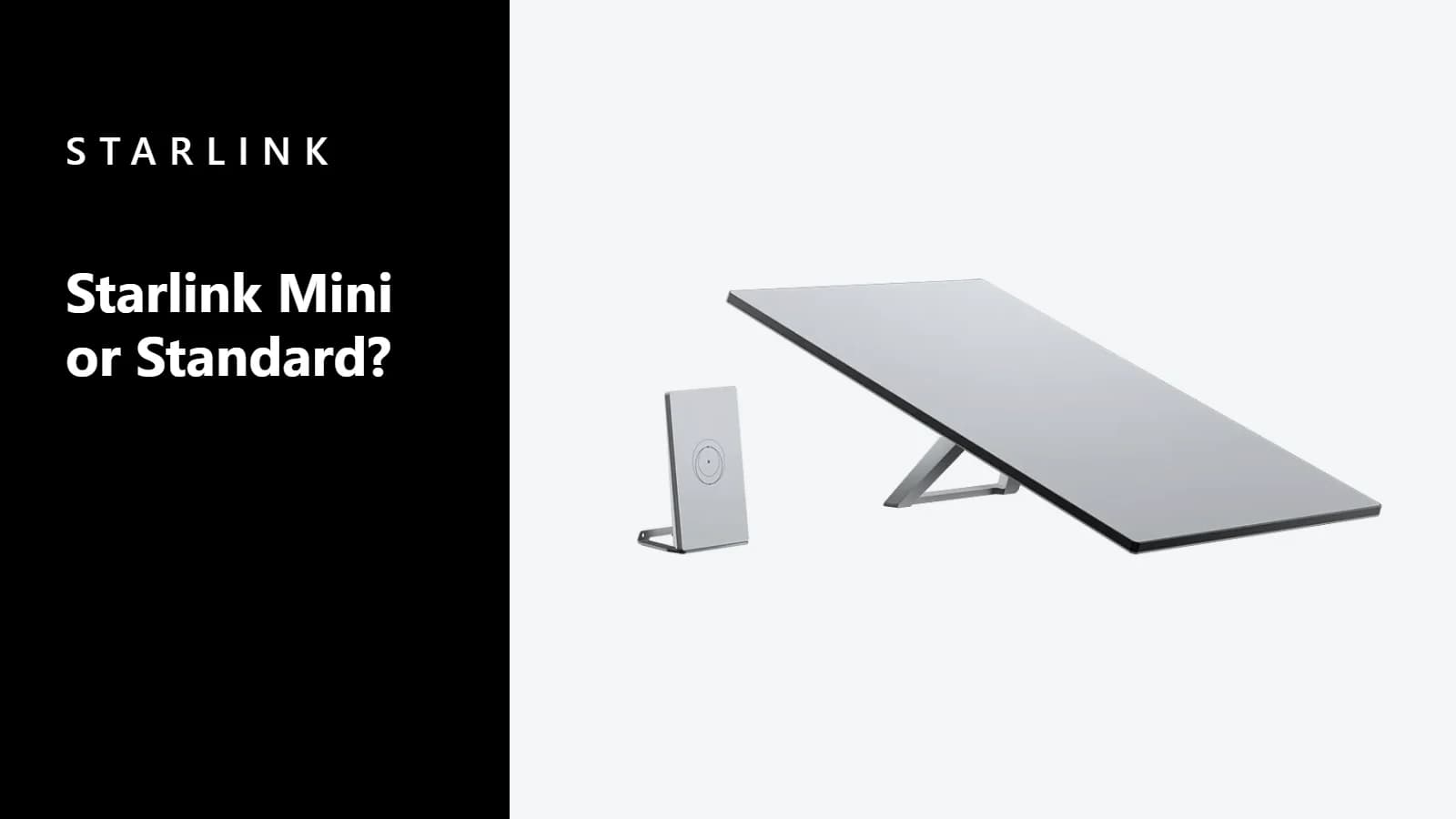
The store states: the biggest hardware difference is whether the primary router lives inside the outdoor dish or sits separately inside your home, alongside power draw and dish footprint.
Starlink Mini puts an integrated Wi-Fi 5 router inside the compact dish and runs on just 25 to 40 W on average. Starlink Standard (V4) connects its larger dish to an indoor Router 3 via a 15 m cable, bringing tri-band Wi-Fi 6 coverage and higher wattage. Where orders also include or offer the compact Router Mini (83.6 × 138 × 27 mm, 112 g, indoor only), that unit adds dual-band Wi-Fi 6 (802.11ax 2×2 MU-MIMO) for up to 204 m², up to 235 devices, and two 1 Gbps Ethernet RJ-45 ports.
Wi-Fi in a large home, UPS battery runtime and Ethernet wiring
When the dish sits outside behind concrete or brick walls, bringing a separate Wi-Fi 6 router indoors beats relying solely on a dish-integrated radio.
Practical rule, untested by us: the Mini's built-in Wi-Fi 5 is rated up to 112 m² and 128 devices, so roof tiles and thick interior walls reduce indoor signal speed in multi-room homes. Standard solves that by running a 15 m cable indoors to the Router 3 (up to 297 m² and 235 devices on tri-band Wi-Fi 6). That is also why current US and UK 100 Mbps orders pair the compact dish with an indoor Router Mini (up to 204 m² and 235 devices), and both kits support Starlink mesh up to 3 nodes (third-party mesh systems are not supported).
For backup power on a UPS or portable power station, the Mini has a decisive advantage: it averages 25 to 40 W versus 75 to 100 W on Standard. Based on those official power ratings, the Mini consumes less power and tends to last noticeably longer on the same battery capacity, and it can run from 12 to 48 V DC or USB-C PD (at least 100 W 20 V/5 A using the official cable).
If you plan to run Ethernet cables or a Dual-WAN failover router, check the ports before wiring. The Mini has 1 locking Ethernet LAN port and the Ethernet cable is sold separately; using a regular unsealed RJ45 plug voids its IP67 Type 4 weather seal. Standard's indoor Router 3 gives you two protected LAN ports. Both support Bypass mode to pass the connection over Ethernet to your own router or mesh system, though exiting Bypass on the Mini requires a factory reset. For official Starlink mesh (compatible with Router Mini, Router 3, and Gen 2 routers up to 3 nodes; incompatible with third-party mesh), both kits stay within the Starlink ecosystem.
Referral credit after 2 billing cycles and the 30-day return rule
Both Mini and Standard kits qualify for the official referral reward when ordered on starlink.com through the referral link: US$ 100 in the US and £40 in the UK, applied as a bill credit after two paid billing cycles.
This reward applies as a bill credit after two paid billing cycles (or in cash via Stripe where available) and never reduces the kit price at checkout; on US and UK rental plans, upfront hardware is already $0 or £0, and you only pay shipping today. Kits bought at retail stores, marketplaces or via account transfer do not qualify and cannot be linked retroactively.
You also have 30 days to test real Wi-Fi reach and sky visibility at home: under the order terms, cancelling the service and returning the undamaged kit within 30 days qualifies for a refund as stated at checkout. Check full referral eligibility on our Starlink referral page and read our contract, cancellation and refund guide before ordering.
Simulator: upfront cost and when the referral credit lands
- Rental kit (US V5 + Router Mini / UK Mini)
- $0 (US) or £0 (UK) rental hardware
- Monthly service price
- $38.50/mo (US) or £40/mo (UK)
- Referral bill credit via link
- $100 (US) or £40 (UK) after 2 cycles
Values read from Nevada and London order pages; credit applies to bills after 2 cycles, not kit checkout.
- Rental kit (Standard 4 / V4)
- $0 (US) or £0 (UK) rental hardware
- Monthly service (200 Mbps US / UK)
- $59.50/mo (US, $0 install) or £60/mo (UK)
- Referral bill credit via link
- $100 (US) or £40 (UK) after 2 cycles
Return the rented hardware undamaged if you cancel; Max also includes free pro installation in UK.
- Retail or marketplace kit
- Full hardware purchase upfront
- $0 rental or plan promo
- Unavailable outside official checkout
- Official referral reward
- $0 (permanently excluded)
Official Starlink referral terms exclude retail stores, third-party marketplaces and transfers.
Checklist before you pick a kit
Run through these five checks before confirming your order so the hardware matches your home layout and backup goals.
5 checks before choosing your kit
0 of 5 checked- I checked on starlink.com which kit comes with each speed tier at my address (V5/Mini + Router Mini vs V4/Standard 4) and whether pro installation is free.
- I checked Wi-Fi layout: over 112 m² or thick walls need the Router Mini included in US/UK 100 Mbps orders, Standard's Router 3 (up to 297 m²), or Starlink mesh.
- For UPS or portable battery backup, I compared the Mini's 25 to 40 W average draw against Standard's 75 to 100 W.
- For wired Dual-WAN or Ethernet runs, I noted that Mini has 1 locking port (cable not included, standard RJ45 loses IP67) while Router 3 has 2 ports indoors.
- I started the order from the official referral link before checkout to lock in the credit after 2 cycles and the 30-day rule to cancel and return undamaged.
Verdict: Starlink Mini or Standard?
For power backup on a UPS or solar station, compact roof or balcony installs, or entry-level 100 Mbps service, the Starlink Mini is the most efficient choice. Its lower 25 to 40 W power draw consumes less energy and tends to last noticeably longer on a UPS or battery than Standard (75 to 100 W), and US and UK 100 Mbps rental bundles already pair it with an indoor Router Mini to lift Wi-Fi 6 coverage up to 204 m².
For larger homes with thick walls, heavy multi-device households, or anyone who wants tri-band Wi-Fi 6 up to 297 m² and dual Ethernet ports right out of the box, Starlink Standard (V4 + Router 3) is built for full-home coverage. In both cases, cancelling the service and returning the undamaged kit within 30 days is covered under the order terms if real-world testing falls short.
"For UPS battery backup and lightweight mounting, Starlink Mini draws substantially less power (25 to 40 W vs 75 to 100 W) and tends to last longer on battery; for large-home Wi-Fi 6 coverage and wired ports straight out of the box, Standard with Router 3 is the stronger indoor setup."Cecília Mauad
Buy it if
- you want low power draw on a UPS or portable battery, compact mounting, or the entry 100 Mbps rental bundle.
- your home fits within the integrated Wi-Fi coverage or you will place the included Router Mini or a wired router indoors.
Skip it if
- you want tri-band Wi-Fi 6 across a large multi-room home and dual wired LAN ports straight from one box.
- your plan selection already bundles Standard 4 with free professional installation and you have reliable grid power.
Frequently asked questions
Is Starlink Mini slower than Standard?+
Residential speeds are governed mainly by the plan tier you subscribe to (100 Mbps, 200 Mbps or Max) and local capacity. The main hardware gap is indoor Wi-Fi coverage (112 m² Wi-Fi 5 built-in vs 297 m² Wi-Fi 6 tri-band on Router 3) and power draw.
Can Starlink Mini cover a large house without another router?+
By itself, the dish's integrated Wi-Fi 5 reaches up to 112 m² and loses strength through roofs and thick walls. US and UK 100 Mbps rental kits include a Router Mini indoors (up to 204 m²), and you can add up to 3 Starlink mesh nodes.
Which kit uses less power on a UPS or backup battery?+
Starlink Mini averages 25 to 40 W (and supports 100 W 20 V/5 A USB-C PD with the official cable), whereas Standard averages 75 to 100 W. With lower draw, the Mini consumes less power and tends to last longer on the same battery.
Can I connect an Ethernet cable and use Bypass mode on both?+
Yes. Mini has 1 locking Ethernet LAN port (Ethernet cable sold separately; a regular RJ45 cable voids IP67) and Router 3 has 2 locking LAN ports. Both support Bypass mode to pass the connection over Ethernet to your own router or mesh (exiting Bypass on Mini requires a factory reset) and official Starlink mesh (compatible with Router Mini, Router 3, and Gen 2 routers up to 3 nodes; incompatible with third-party mesh).
Does the referral credit work on both Starlink Mini and Standard?+
Yes. Ordering either kit directly on starlink.com via the referral link applies the US$ 100 (US) or £40 (UK) bill credit after two paid monthly cycles.
Shopping at Starlink
Starlink
Applied automatically through Cecília's link.
- Valid for
- First subscription to a Residential or Roam plan, ordered on starlink.com through the link
- Stacks with other promotions?
- The reward is not a discount on the order: it arrives after two months of service, and the order keeps the price and promotions Starlink…
- Checked on
- November 23, 2026


Hi, I’m Bruno
Cecília’s husband and the other half of Em Casa, behind the camera and the computer.
Related articles
View all Starlink
 Residential 100 Mbps, 200 Mbps, or Max: prices, hardware, and which plan fits
11/24/2026, Decision Guide Starlink
Buy Starlink on starlink.com or at Best Buy, Amazon, Home Depot and Currys?
11/24/2026, Buying Guide Starlink
Does Starlink have a contract? A $0 rental kit, no fixed term in the US and UK, and the 30-day refund
11/20/2026, Practical Guide Starlink
Is Starlink worth it? Plan cost, unstable local fiber and backup use
11/20/2026, Buying Guide Starlink
 on Trustpilot: a 1.6 score from 879 reviews and what people complain about
11/20/2026, Reputation Analysis Starlink
Is Starlink legit? How to find the official site and check who is selling
11/20/2026, Editorial